Your classifier hands you probabilities, and turning them into yes-or-no answers takes a cut-off. Almost every pipeline uses 0.5, because it’s the default, not because anyone measured it. In the experiment below, that default made a model less accurate than one that always answers “no”.
TL;DR
- 0.5 is only right when the probabilities are calibrated. Common recipes for imbalanced data, like
class_weight="balanced", shift them, and the best cut-off moves with them. - Moving the cut-off is free accuracy. On the Bank marketing dataset, the threshold Thresher picked on validation data removed 35% of a model’s test errors, without retraining anything.
- Thresher finds that threshold exactly, in O(n log n), from one line of Python or one terminal command, and scales out to Ray and Spark.
The default nobody chose
A cut-off of 0.5 means “predict yes when yes is more likely than not”. That’s the right rule only if the probabilities mean what they say. Very often they don’t:
- Class weights and resampling.
class_weight="balanced", oversampling or undersampling all make the rare class look more common during training. The model learns that, and its probabilities drift upwards. - Imbalance and overlap. When one class is rare and the two classes overlap, small shifts in the scores move a lot of samples across 0.5.
- Miscalibrated models. Plenty of models are confident in the wrong places, and their scores were never meant to be read as probabilities.
Here’s what that looks like on real data. The Bank marketing dataset comes from a bank’s phone campaigns: did the client subscribe to a term deposit? Only 11.7% did. I trained gradient-boosted trees with balanced class weights, which is a textbook recipe for imbalance, and measured accuracy on held-out data at every possible cut-off:
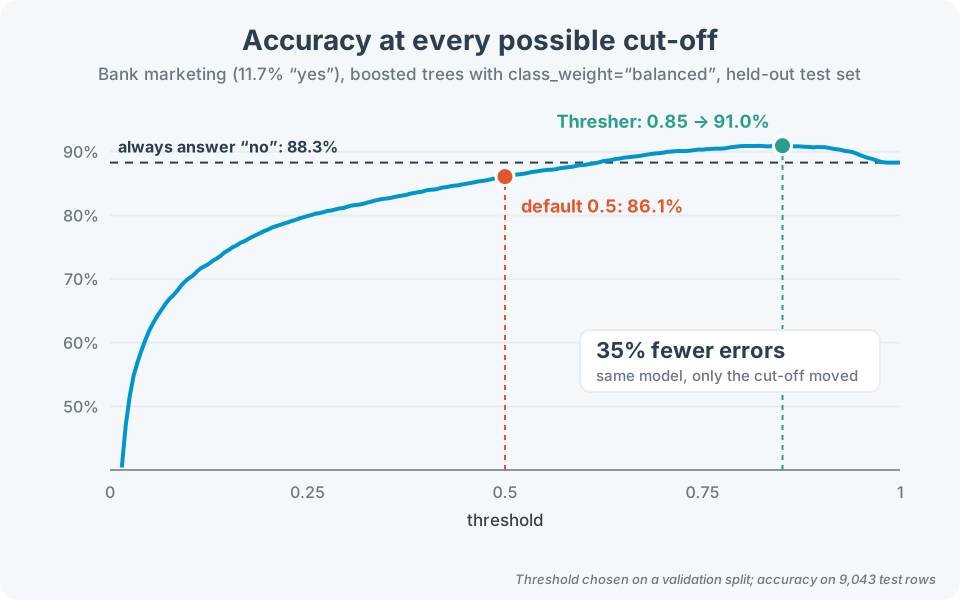
At 0.5 the model gets 86.1% right, less than the 88.3% you’d get by answering “no” to everyone. At the cut-off Thresher picked, 0.85, it gets 91.0%. Same model, same features, no retraining: 35% fewer errors.
Six models, two datasets
One curve could be luck, so I repeated the experiment on two public datasets, Adult income (48,842 people, 23.9% earn over $50K) and Bank marketing (45,211 calls, 11.7% said yes), with three models each. Each dataset was split 60/20/20. Thresher chose the threshold on the validation part, and accuracy was measured on the test part, which neither the model nor the threshold had seen.
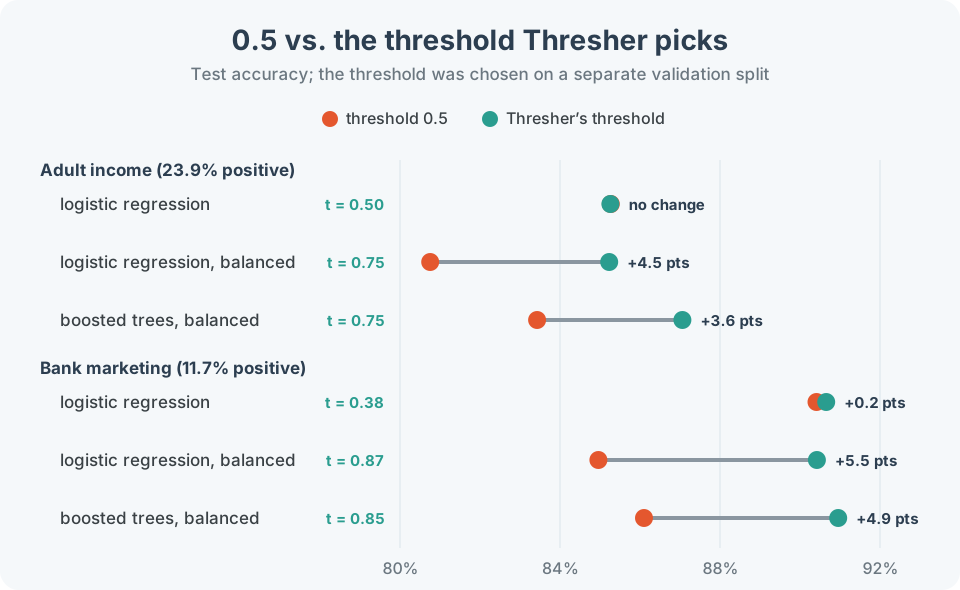
- When the probabilities are calibrated, 0.5 is fine, and Thresher says so. Plain logistic regression on Adult gets a threshold of 0.50 and no change in accuracy. It doesn’t invent a gain where there isn’t one.
- When they aren’t, the gain is large. Both class-balanced models get thresholds between 0.75 and 0.87, and 3.6 to 5.5 points of accuracy. That’s 22-36% of their test errors gone.
- It costs nothing. Finding each threshold took at most a few dozen milliseconds on about 9,000 validation rows.
In code, it’s one extra line between training and predicting:
from thresher import Thresher

model.fit(X_train, y_train)

p_val = model.predict_proba(X_val)[:, 1]
t = Thresher(labels=(0, 1)).optimize_threshold(p_val, y_val)

p_test = model.predict_proba(X_test)[:, 1]
y_pred = (p_test > t).astype(int)
Choose the threshold on validation data, not on the test set. A threshold tuned on the test set flatters the model just like any other setting tuned there.
Using it
Scores can be a list, a numpy array or a pandas Series, straight out of predict_proba and without being copied. The answer is a plain float. Labels default to -1 and 1, and labels=(0, 1) covers the scikit-learn convention.
Or skip Python entirely. Installing the package also installs a command that reads a file with a score and a class per row:
$ thresher scores.csv --labels 0,1
0.35
It prints the bare number and nothing else, so it pipes cleanly into scripts: THRESHOLD=$(thresher scores.csv).
How it finds the best cut-off exactly
The obvious approach tries every candidate threshold and re-scores the whole dataset each time. That’s O(n²), and it gets slow fast. Thresher’s default algorithm, the exact sweep, avoids the repeated work with one observation: moving the threshold past one sample changes the number of correct answers by exactly one.
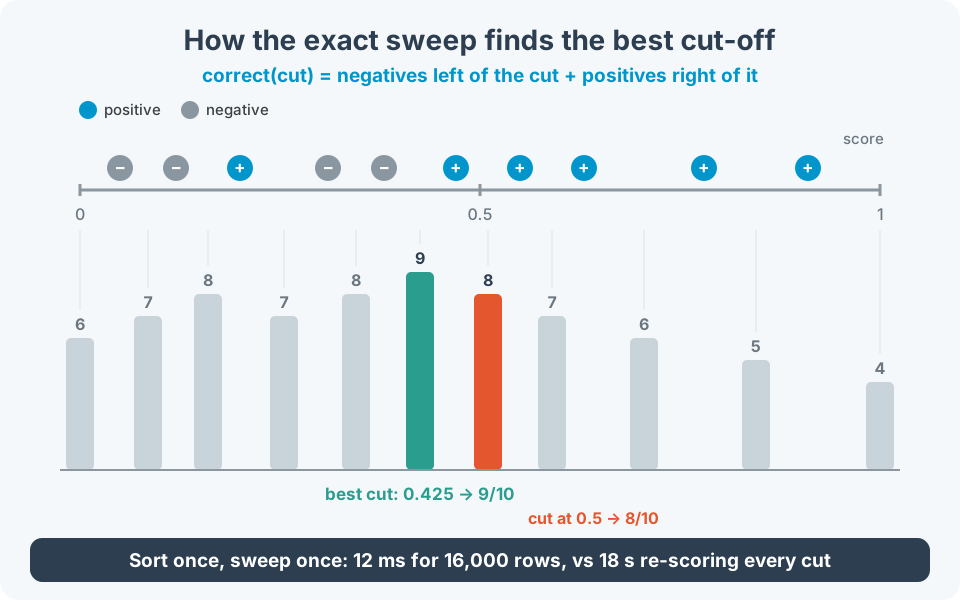
So Thresher sorts the scores once and walks through them, keeping two running totals: negatives to the left of the cut, positives to the right. Every candidate costs constant time, the sort is the only real expense, and the answer is the best threshold that exists, not an approximation. It’s the same scan used to pick a decision-stump split or to draw an ROC curve.
The difference is dramatic: at 16,000 rows the sweep takes 12 ms, while re-scoring every candidate takes about 18 seconds. That’s roughly 1,400 times faster, and the gap grows with every row.
Thresher ships seven algorithms in total: the exact sweep (exact, the default), a histogram sweep (hist), linear search (ls), grid search (grid) and its stochastic variant (sgrid), an evolutionary algorithm (gen) and stochastic gradient descent (sgd). The exact sweep is the one to use. The others stay selectable, and they’re interesting if you want to see how a particular search behaves. Here’s how they compare with the exact optimum on 2,000 rows, averaged over 5 seeds, for classes that overlap and for imbalanced classes:
| Algorithm | Overlap | Imbalance | Time |
|---|---|---|---|
exact |
100.00% | 100.00% | 1 ms |
hist |
99.99% | 99.98% | 1 ms |
ls |
100.00% | 100.00% | 221 ms |
grid |
99.99% | 99.92% | 11 ms |
sgrid |
97.81% | 99.62% | 1 ms |
gen |
98.23% | 88.64% | 117 ms |
sgd |
97.01% | 88.37% | 12 ms |
From a laptop to a cluster
- Data too big to hold? The
histalgorithm counts both classes into a fixed number of bins in one pass and sweeps the bins instead of the rows. At a million rows it uses 49 KB of memory, compared with 107 MB for the exact sweep, and at the default 1,024 bins it captures 99.98% of the achievable accuracy. - More cores?
backend="mp"spreads the counting over your CPU cores with nothing extra to install, andbackend="ray"spreads it over a Ray cluster. - Data in a data lake?
SparkThreshertakes a DataFrame and two column names, and never collects the rows. Spark does onegroupByand returns a summary of about 1,024 rows, however large the input, and the driver runs the same sweep on that summary.
from thresher.spark import SparkThresher

df = spark.read.parquet("s3://predictions/2026-08/")
threshold = SparkThresher().optimize_threshold(
    df, score_col="probability", label_col="label"
)
A backend changes where the counting happens, never the answer: the tests check that every backend returns identical results.
One caveat: accuracy is one goal among many
Thresher answers one question precisely: which cut-off classifies the most samples correctly? Accuracy treats every mistake the same. If a missed fraud costs you far more than a false alarm, or recall matters more than precision, the threshold you want is a different one, and it’s worth deciding that before you tune anything.
Try it
pip install thresher-py

# optional extras: a tqdm progress bar, Ray, Spark
pip install "thresher-py[progress]"
pip install "thresher-py[ray]"
pip install "thresher-py[spark]"

Oskar Jarczyk
If you enjoyed this post, you may also like my Facebook page. If you need help with Data science and ML, reach out to me at oskar.jarczyk@gmail.com.